










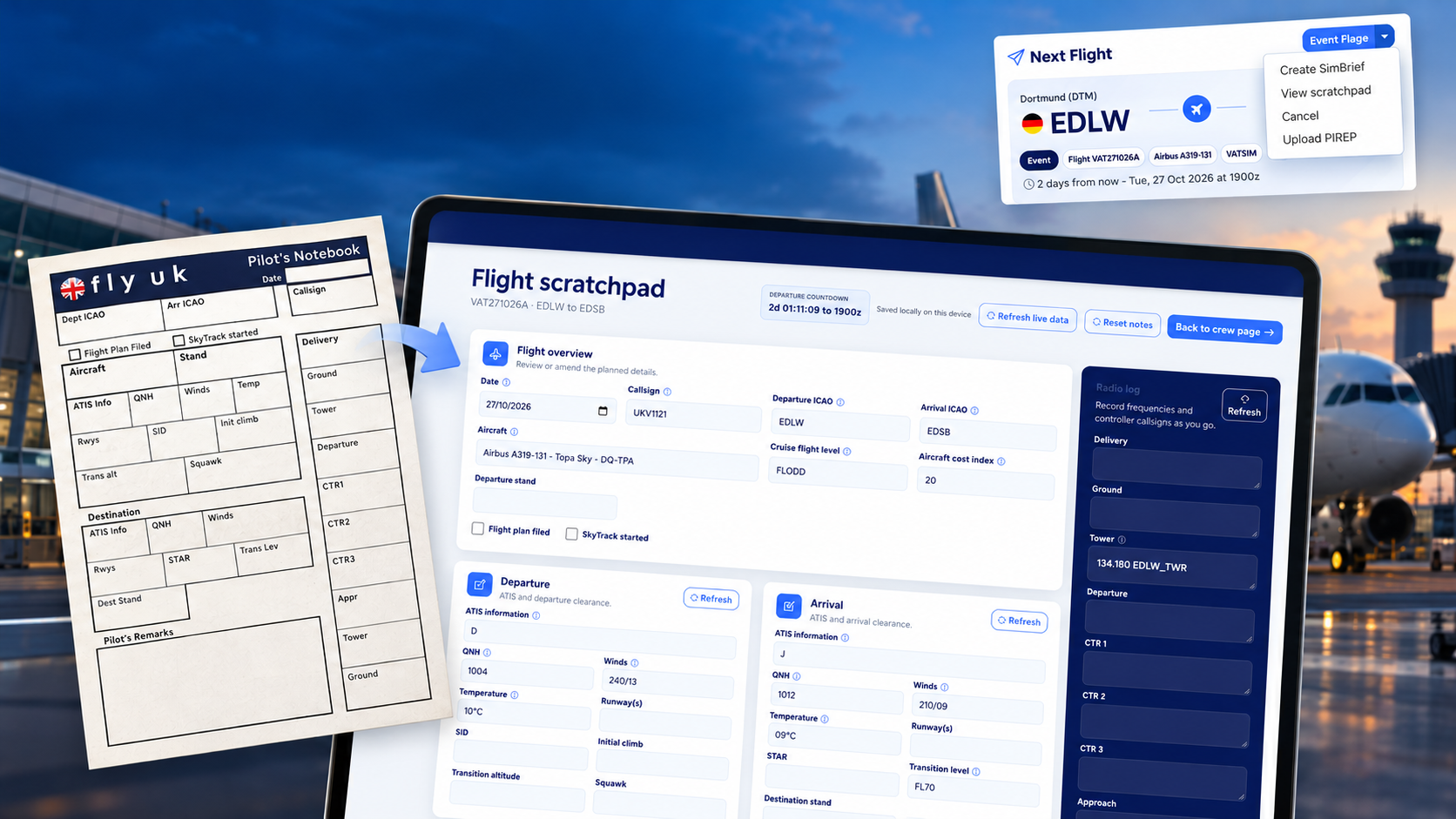
For many years, Fly UK pilots have had access to our Pilot’s Notebook — an A5 printable notepad designed to help you record the important information you need throughout a flight.
It is particularly useful when flying online on VATSIM, providing somewhere to note ATIS information, clearances, frequencies, squawk codes, runways, SIDs and STARs, as well as general remarks. It can, of course, be useful for offline flying too.
The original Pilot’s Notebook isn't going anywhere. We know plenty of pilots prefer having a pen and paper alongside them on the flight deck, but we wanted to provide another option for those who would rather keep everything digital.
That idea became the new Fly UK Flight Scratchpad.
From paper to digital
The initial idea was fairly simple: recreate the familiar fields from the Pilot’s Notebook digitally, allowing pilots to enter and retain the information they need throughout their flight.
Once we started testing it, however, it quickly became apparent that we could do much more than simply replace the piece of paper.
Fly UK already has access to some of the information a pilot would otherwise need to enter manually, so the scratchpad attempts to pre-fill as much useful information as possible.
It brings together data from several sources:
- Your Fly UK booking provides the core flight, aircraft and route information.
- VATSIM data, where available, can provide ATIS information and online controller details.
- SimBrief data, where available and linked to your flight, can provide additional flight planning information.
Small information icons alongside pre-filled fields allow you to see the source used to populate that information.
The result is that when you open your scratchpad, much of the basic information you need may already be waiting for you — leaving you to add or amend the details relevant to your flight.
Top tip: Generate your SimBrief plan before opening the scratchpad to have more flight details filled in automatically. You can still open it earlier and refresh the live VATSIM information later.
Your working scratchpad
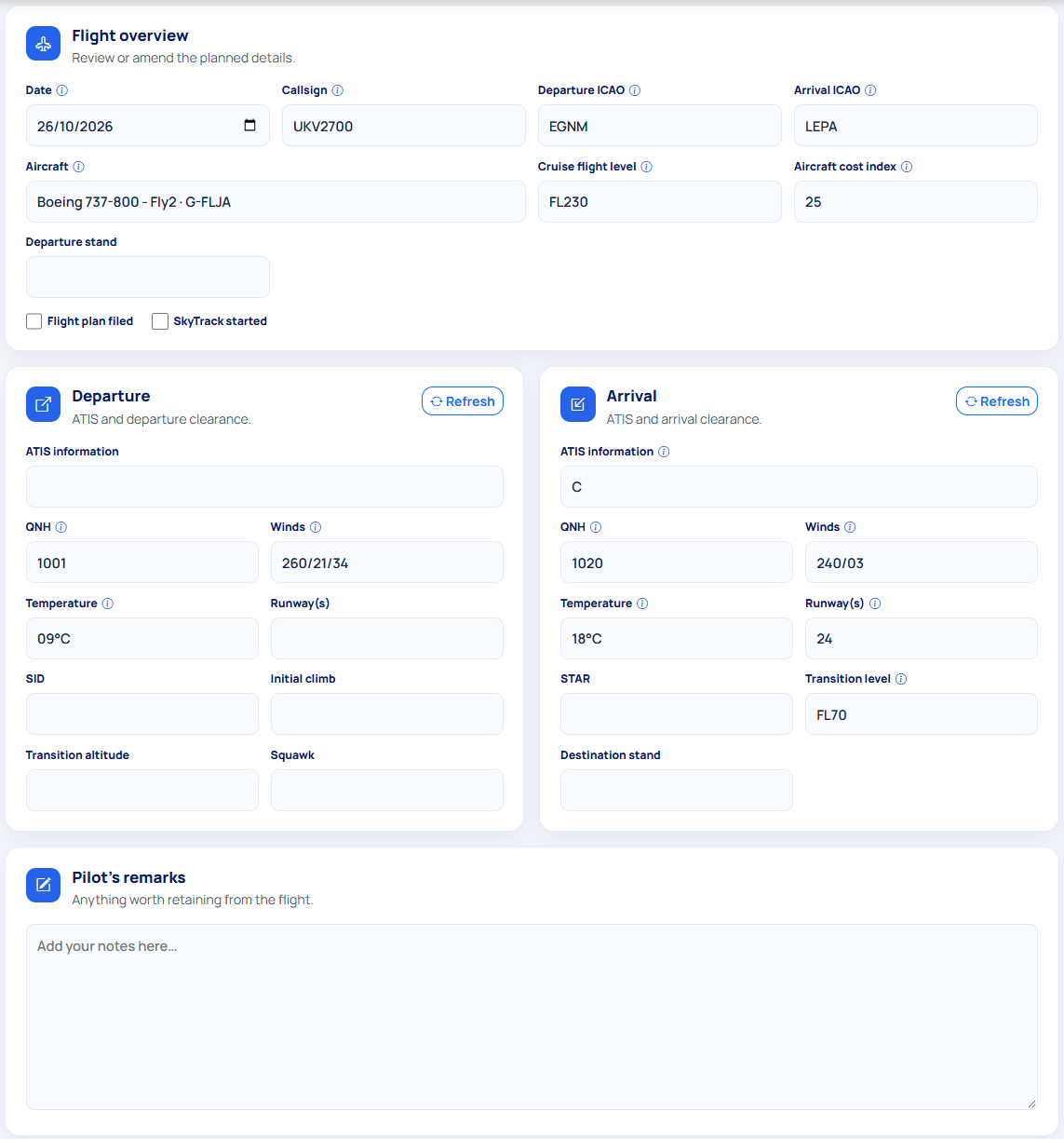
Just like the original Pilot’s Notebook, everything remains editable.
There are spaces for departure and arrival information including runways, SID and STAR, stands, initial climb, transition levels, squawk and other useful details. You can also keep track of whether your flight plan has been filed and SkyTrack started, with a larger remarks area available for anything else you want to retain during the flight.
Alongside the main scratchpad is a dedicated radio log, with spaces for Delivery, Ground, Tower, Departure, Centre, Approach and your arrival frequencies.
Where VATSIM controller information is available, some of these details can be pre-filled for you, while remaining fully editable as you progress through your flight.
Refresh live information when you need it
Conditions and online ATC coverage can change throughout a flight, so the scratchpad allows you to refresh departure, arrival and radio information independently.
The scratchpad does not continually update in the background — you're in control of when fresh information is requested.
When refreshing a section, live information may replace values you've previously entered within that section, so it's worth checking the updated information afterwards. Other areas of your scratchpad remain unaffected.
As with any flight planning aid, information displayed in the scratchpad should be checked against the appropriate current sources and any instructions received from ATC.
Saved on your device
Your scratchpad entries are saved locally in your browser for that flight, allowing you to leave the page and return to your notes later on the same device and browser.
They aren't stored against your Fly UK account or synchronised between devices, so if you start your scratchpad on your PC, for example, those notes won't automatically appear if you later open it on your tablet.
There's also a Reset notes option if you want to clear your locally saved entries and start again.
Ready for departure
At the top of the scratchpad you'll also find a countdown to your booked departure time.
If you're aiming for an on-time departure, it gives you an immediate indication of how much preparation time you have remaining before your scheduled departure.
Once that time has passed, the scratchpad displays the scheduled departure time instead.
It's a small addition, but one that helps turn the scratchpad into something you can open during pre-flight and keep alongside you throughout your flight.
Available with your booked flight
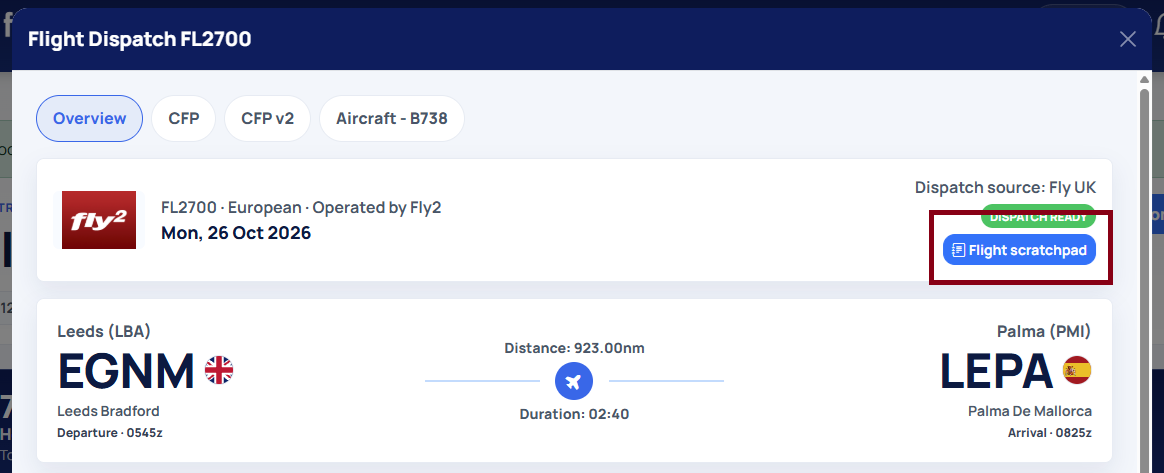
You can access the Flight Scratchpad from your Dispatch page, or by selecting View scratchpad from the dropdown menu on your Next Flight card on the Crew page, where available.
The page has been designed to be responsive, so you're not limited to keeping it open on your main PC. You can resize it alongside your simulator on a second screen, or use it on a tablet or mobile device.
This makes it particularly useful if you already have a spare tablet or device alongside your flight simulator setup.
Prefer pen and paper?
That's absolutely fine too.
The digital scratchpad is intended as an alternative, rather than a replacement, for the original Fly UK Pilot’s Notebook. If you prefer physically writing down your clearances and frequencies, you can continue to download and print the A5 Pilot’s Notebook here.
Whether you use the original notebook or the new digital version, the aim is the same: to make it easier to keep the important information for your flight organised and close at hand.
The Flight Scratchpad is available now — book a flight and give it a try on your next departure.
As always, we'd love to hear your feedback and ideas as we continue to improve it.







Comments
This is a community-moderated discussion. By posting you agree to our Terms & Conditions.